








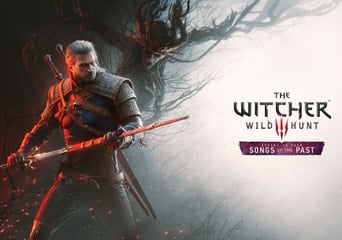
The Witcher 3: Wild Hunt - Songs of the Past PRE-ORDER (PC) GOG Key Global
Looking for a different edition or platform? See all available options here.
- PRE-ORDER TBA
- KeyActivation type
- StandardEdition
- Global
- GOG
- EN
About the product
- Developer:
- CD PROJEKT RED
- Publisher:
- CD PROJEKT S.A.
- Restrictions:
- Languages:


Purchase your GOG key for The Witcher 3: Wild Hunt - Songs of the Past on GAMIVO for fast processing and instant digital delivery. Redeem your key directly worldwide without regional restrictions.
What's Included:
-
The Witcher 3: Wild Hunt - Songs of the Past
Step-by-Step Activation Guide:
Option A: Activation via GOG Galaxy Desktop Client
- Launch the GOG Galaxy application on your PC and log in to your GOG account.
- Click the gear icon in the top-left corner (or the "+" button) and select "Add games & friends" -> "Redeem GOG code".
- Enter your unique digital key provided by GAMIVO and click "Continue".
- Confirm redemption to add the product to your GOG library.
Option B: Activation via Web Browser
- Open your web browser and navigate to gog.com/redeem.
- Log in to your GOG account.
- Enter or paste your digital key from GAMIVO into the text box and click "Continue".
- Confirm activation to permanently bind the product to your account.
Product Details:
- Platform: PC
- DRM / Activation: GOG
- Region: Global
- Edition: Standard Edition
- Delivery: Instant Digital Code
Gamivo.com Limited is not affiliated with Product Owner and all products come from independent sellers.
The Witcher 3: Wild Hunt - Songs of the Past PRE-ORDER FAQ
- Can I activate this product in my region?
Product activation depends on the specific region tag assigned to the offer on GAMIVO. Offers tagged as Global can be activated anywhere in the world without restrictions. If an offer is region-restricted, check the "Can be activated in" banner on the product offer page prior to purchase to confirm compatibility with your location.
- How fast will I receive my product?
GAMIVO delivers digital codes instantly for released titles. As soon as your payment is processed, you’ll get your activation key. For pre-order purchases, your code may be delivered on or shortly after the release date as supplier stock is distributed.
- How do I activate The Witcher 3: Wild Hunt - Songs of the Past on Steam?
- Launch the Steam desktop application on your PC and log in to your account.
- Click "Add a Game" in the bottom-left corner of the client window.
- Select "Activate a Product on Steam..." from the menu.
- Click "Next", accept the agreement, and enter your CD key from GAMIVO.
- Click "Confirm" to permanently add the product to your Steam library.
- How do I activate The Witcher 3: Wild Hunt - Songs of the Past on GOG?
You can redeem your GOG digital key using either of these methods:
Option A: Activation via GOG Galaxy Desktop Client
- Launch the GOG Galaxy application on your PC and log in to your GOG account.
- Click the gear icon in the top-left corner (or the "+" button) and select "Add games
- friends" -> "Redeem GOG code".
- Enter your unique digital key provided by GAMIVO and click "Continue".
- Confirm redemption to add the product to your GOG library.
Option B: Activation via Web Browser
- Open your web browser and navigate to gog.com/redeem.
- Log in to your GOG account.
- Enter or paste your digital key from GAMIVO into the text box and click "Continue".
- Confirm activation to permanently bind the product to your account.