
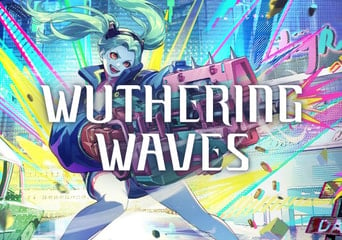
Wuthering Waves 60 Lunites Direct Top-Up
- Up to 30 minDelivery
- Direct Top-up
- Global
Lunites
Lunite Subscription
Promoted offers
 Cnlgaming99.91%57K0 0 55mPromoted offer€0.89
up to 3% Cashback Promoted offer€1.482% Cashback Save 40% with SMART€0.893% Cashback The fastest delivery- HQStore99.72%1K0 1h 20mPromoted offer€0.92
up to 3% Cashback Promoted offer€1.532% Cashback Save 40% with SMART€0.923% Cashback - Lotkeys99.92%22K0 1h 5mPromoted offer€0.92
up to 3% Cashback Promoted offer€1.542% Cashback Save 40% with SMART€0.923% Cashback


All offers (3)
- Cnlgaming99.91%57K0 0 55mLowest offer€0.70
up to 2% Cashback Lowest offer€1.161% Cashback Save 40% with SMART€0.702% Cashback The fastest delivery - HQStore99.72%1K0 1h 20m€0.73
up to 2% Cashback €1.211% Cashback Save 40% with SMART€0.732% Cashback - Lotkeys99.92%22K0 1h 5m€0.73
up to 2% Cashback €1.221% Cashback Save 40% with SMART€0.732% Cashback

About the product
Features:
- A stunning world to explore,
- Memorable and diverse characters,
- Fast-paced combat,
- Immersive storyline,
- Customizable skills.
Get bonus Lunites for your first purchase
If you’ve never made an in-game purchase or used any platforms to top up your character, you’ll be eligible for the following benefits:
- Pick 300 Lunite to receive 300+300 Lunite
- Pick 980 Lunite to receive 980+980 Lunite
- Pick 1980 Lunite to receive 1980+1980 Lunite
- Pick 3280 Lunite to receive 3280+3280 Lunite
- Pick 6480 Lunite to receive 6480+6480 Lunite
What are Lunites?
Enhance your gaming experience with Lunites, a premium resource that unlocks access to weapons, armor, skills, and more. Primarily available through real-money purchases, Lunites can be converted into Astrites at a 1:1 ratio. Use them to acquire exclusive in-game items, bundles, and Convene Tokens, essential for unlocking powerful characters and weapons.
Awaken the hero within you
Step into the breathtaking post-apocalyptic world of Wuthering Waves, a story-rich open-world action RPG from Kuro Games. Play as "Rover," a roving voyager thrust into a land reborn from ashes, on a mission to reclaim lost memories, form unbreakable bonds, and chart a path to a brighter future.
Travel to a captivating realm
Traverse the expansive, beautifully desolate world shaped by the Lament, where remnants of humanity rise from collapse. Each area brims with gripping lore, rich landscapes, and challenges that evoke awe and curiosity. Unleash your inner adventurer by soaring through the skies, scaling walls, and grappling across great distances
Fast-paced combat
Battle it out with fluid, action-packed mechanics that reward precision and strategy. Engage enemies using thrilling dodge, counterattack, Echo Skill systems, and flashy quick-time events that make every encounter unforgettable.
Meet fantastic characters
Join a diverse group of companions, each with their own unique skills and personalities. Their abilities enhance both combat and storytelling, offering a mix of engaging gameplay and emotional depth.
Gamivo.com Limited is not affiliated with Product Owner and all products come from independent sellers.
Guide
How to activate:
- Insert your UID.
- Type your Area - eg. America, Asia, Europe, HMT (for Hong Kong, Malaysia, and Thailand), SEA.
Wuthering Waves FAQ
- What is Wuthering Waves?
It is an open-world action role-playing game with anime-style visuals and real-time combat. Players explore a post-apocalyptic sci-fi world filled with enemies called Tacet Discords. The game mixes exploration, story quests, puzzles, and character collection mechanics. Its combat focuses heavily on dodging, parrying, and combo timing.
- What is Wuthering Waves about?
The story takes place in a post-apocalyptic world recovering from a catastrophic event called the Lament. Humanity rebuilds while battling monsters born from distorted sound energy. Players explore the world while uncovering hidden truths about civilization and Rover’s past. Themes include memory, survival, and technological evolution.
- What type of game is Wuthering Waves?
It is primarily an action RPG with open-world exploration. The game blends fast combat mechanics with character collection systems. Players build teams and engage in story-driven quests. Live updates add events and new content regularly.
- Is Wuthering Waves a gacha game?
Yes, it is a gacha game combined with an open-world action RPG system. Players obtain characters and weapons through randomized banners using in-game currency. The system includes pity mechanics that guarantee high-rarity rewards after enough pulls. However, gameplay also emphasizes exploration and skill-based combat rather than only luck.
- When did Wuthering Waves come out?
The game officially launched worldwide on May 23, 2024. It released simultaneously on PC and mobile platforms. The launch followed multiple beta tests that helped refine combat and performance. Since release, it has received regular updates and new regions.
- Who made Wuthering Waves?
The game was developed by Kuro Games, a studio known for action-focused titles. The company previously created Punishing: Gray Raven. Development emphasized fast combat mechanics and a darker sci-fi world. Kuro Games continues to support the title through frequent updates and live-service events.
- How to use sensor in Wuthering Waves?
The Sensor tool highlights nearby interactable objects and clues during exploration. Activate it using the assigned key or button shown in your control settings. It reveals hidden tracks, collectibles, or quest objectives in the environment. Using it frequently helps complete investigation-type missions faster.
- How big is Wuthering Waves?
The game is relatively large due to its open world and high-quality assets. File size varies depending on platform and updates installed. On PC it requires significantly more space than mobile versions. Future patches can increase the total size over time.
- How big is Wuthering Waves on mobile?
On smartphones, the game occupies roughly 20 GB once fully installed. Size varies between Android and iOS due to compression differences. Updates regularly add new assets. Players should maintain extra storage for patches.
- What is soft pity in Wuthering Waves?
Soft pity refers to increased chances of receiving a high-rarity character before reaching the guaranteed pity limit. After a certain number of pulls, probability gradually rises with each attempt. This system reduces extremely long unlucky streaks. Players often track pull counts to predict when soft pity begins.
- What is Wuthering Waves about?
The story takes place in a post-apocalyptic world recovering from a catastrophic event called the Lament. Humanity rebuilds while battling monsters born from distorted sound energy. Players explore the world while uncovering hidden truths about civilization and Rover’s past. Themes include memory, survival, and technological evolution.
- When does Wuthering Waves maintenance end?
Maintenance times vary depending on each update. Typically, maintenance lasts several hours before a new patch goes live. The exact end time is announced in official notices before updates. Compensation rewards are usually given after servers reopen.
- How to get to Rinascita in Wuthering Waves?
Rinascita becomes accessible through story progression in later updates. Players must complete main quests leading into that region. Once unlocked, fast travel points allow easy access. Following the main narrative is the primary requirement.
- How to link Wuthering Waves account to PS5?
Log in to the game on PS5 and choose account linking when prompted. Sign in using the same email or platform account used previously. Confirm synchronization through the account management menu. Once linked, progress carries across supported platforms.
- How to claim Union Level rewards in Wuthering Waves?
Open the main menu and navigate to the Union Level section. Rewards unlock automatically when you reach new levels. Click the claim button beside available rewards. These often include currency, materials, and upgrade items.
- How to use modifier in Wuthering Waves?
Modifiers usually refer to gameplay buffs or Echo effects. Equip them through character or Echo menus depending on the system involved. They enhance stats or change combat effects. Reading descriptions helps optimize builds.
- How to get to Septimont in Wuthering Waves?
Septimont unlocks through story progression tied to newer region updates. Completing required main quests opens travel routes there. After unlocking, teleport points allow fast travel. Following main story objectives is essential.
- How to uninstall Wuthering Waves?
To uninstall the game, open your device’s app or program management settings. On PC, go to “Apps & Features” or the Control Panel and locate the game in the installed programs list. Select it and click Uninstall, then follow the prompts. After removal, you can optionally delete leftover folders in the installation directory to free extra space.