


Star Wars: Zero Company (PC) Steam Gift Global
Looking for a different edition or platform? See all available options here.
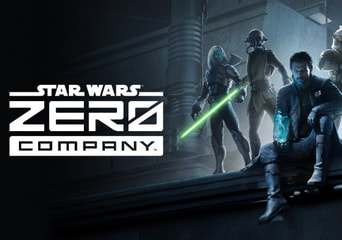
- InstantDelivery
- KeyDigital product
- StandardEdition
- Global
- Steam Gift
- EN/DE/FR...
Promoted offers
 VICKeys99.81%47KPromoted offer199.46 złPromoted offer212.20 złSMART price199.46 zł
- Gamextra99.03%108KPromoted offer206.21 złPromoted offer239.78 złSMART price206.21 zł
- Playtime99.63%707KPromoted offer268.42 złPromoted offer282.56 złSMART price268.42 zł


All offers (3)
- VICKeys99.81%47KLowest offer184.26 złLowest offer196.03 złSMART price184.26 zł
You may also like
Empire of the Ants Empire of the Ants
Anno 2205 Anno 2205
Evil Genius 2: World Domination Evil Genius 2: World Domination
Sid Meier's Civilization VII Sid Meier's Civilization VII
Sea of Stars Sea of Stars
Tabletop Simulator Tabletop Simulator
Hearts of Iron IV Hearts of Iron IV
Final Fantasy Tactics: The Ivalice Chronicles Final Fantasy Tactics: The Ivalice Chronicles
Xenonauts 2 Xenonauts 2
Dorfromantik Dorfromantik






About the product
- Developer:
- Bit Reactor
- Publisher:
- Electronic Arts
- Release date:
- 2026-08-27
- Restrictions:
- Languages:


Purchase Star Wars: Zero Company Standard Edition as a Steam Gift on GAMIVO.
What's Included:
-
Full base game: Star Wars: Zero Company (Standard Edition) delivered via Steam Gift
Step-by-Step Activation Guide (Steam Gift):
- Open the link you have received after your purchase.
- Log in using your Steam account or provide them with your Steam profile URL.
- Make sure to choose the same country as your store country found in the Steam account details.
- Click on 'Confirm' or 'Activate' to continue the activation process.
- An automated system will add your Steam account to the friend list. Please accept the invite.
- After you accept the friend request, it will send you your purchased game as a gift.
Product Details:
- Platform: PC
- DRM / Activation: Steam Gift
- Region: Global / Region-Free
- Edition: Standard Edition
- Delivery: Digital
Gamivo.com Limited is not affiliated with Product Owner and all products come from independent sellers.
Available editions
- Standard Edition includes:
- The base game: Star Wars: Zero Company.
- Deluxe Edition includes:
- The base game: Star Wars: Zero Company,
- Grand Army of the Republic Cosmetic Pack,
- Shadow Collective Cosmetic Pack,
- Five Weapon Set Themes.
Star Wars: Zero Company FAQ
- Can I activate this product in my region?
Product activation depends on the specific region tag assigned to the offer you select on GAMIVO. Offers labeled as Global / Region-Free can be activated anywhere in the world without restrictions. Region-specific offers (such as Europe / EU, United States, United Kingdom, or others) can only be activated on Steam accounts registered within those designated countries. Always check the "Can be activated in" notification banner on the offer page before completing your purchase to verify compatibility with your location.
- How fast will I receive my product?
GAMIVO provides instant digital delivery for available products. Once your payment is processed, your order details will be displayed in your account dashboard and sent to your email. For pre-order purchases, your Steam CD key, Steam Gift link, or Steam Account credentials will be delivered on or shortly after the game's release date as supplier stock is distributed.
- How do I activate or access Star Wars: Zero Company on Steam?
Activation steps depend on the specific product format you purchased:
-
Steam CD Key:
- Launch the Steam desktop application and sign in to your Steam account.
- Click "Add a Game" in the lower-left corner of the client interface.
- Select "Activate a Product on Steam..." from the pop-up menu.
- Click "Next", accept the Steam Subscriber Agreement, and enter your CD key from GAMIVO.
- Click "Confirm". The game is now permanently tied to your Steam library and ready to install.
-
Steam Gift:
- Open the link you have received after your purchase.
- Log in using your Steam account or provide them with your Steam profile URL.
- Make sure to choose the same country as your store country found in the Steam account details.
- Click on 'Confirm' or 'Activate' to continue the activation process.
- An automated system will add your Steam account to the friend list. Please accept the invite.
- After you accept the friend request, it will send you your purchased game as a gift.
-
Steam Account:
- Follow the instructions attached to the link you received.
- You will receive credentials for your new Account for the chosen platform.
- Remember to modify the email address and password after the first login.
-
- What is the difference between the Standard and Deluxe Edition of Star Wars: Zero Company?
The Standard Edition includes the complete base game. The Deluxe Edition includes the full base game plus The Grand Army of the Republic Cosmetic Pack, Shadow Collective Cosmetic Pack, and Five Weapon Set Themes, unlocking exclusive Clone Wars-era cosmetics, uniforms, and weapon themes for your squad.
- When was Star Wars: Zero Company released?
Star Wars: Zero Company released on August 27, 2026, for PC (Steam), PlayStation 5, and Xbox Series X|S.