
How to Save Money on PC Games by Choosing the Right Edition: Standard, Deluxe or Ultimate
If you are working out how to save money on PC games, start with the edition you pick. A premium edition is a bundle, and it only saves money if you would buy its contents anyway. Names like Deluxe, Ultimate, Premium or Vault say nothing about value until you read the list of extras.
The simplest way to save money on PC games is to buy the edition whose extras you will actually use. A Deluxe or Ultimate edition adds content such as a season pass, DLC, cosmetic items, in-game currency or early access to the standard game. If you would not buy those extras separately, the standard edition is the cheaper choice.
This guide shows what premium editions contain. Our sources are the edition descriptions of five PC games on Steam and Valve’s Steamworks documentation for developers. We read them on September 23 and 26, 2026. For other ways to spend less, see our general guide to cutting PC gaming costs.
What changes between Standard, Deluxe and Ultimate editions?
A standard edition is the base game on its own. Every higher edition is the base game plus a package of extra content. Valve’s documentation says “A Deluxe Edition is typically comprised of the base game plus some additional content.” It lists examples such as “In-game items, DLC, Soundtracks, Artwork.” Edition names vary from game to game.
The extras in premium editions fall into five groups:
- Cosmetic items: skins, weapon designs or mounts that change looks, not gameplay.
- DLC and expansions: new story content, regions or characters.
- Season passes: a single purchase of DLC that is already out and DLC that will come later.
- In-game currency and boosts: points, battle passes, tier skips or experience boosts for online modes.
- Early access: playing the full game a few days before its official release.
On price, Valve’s guidance is that a Deluxe Edition should cost “slightly above, but still relatively close to the base game price.”
What does a season pass include?
A season pass is one purchase that covers a set list of DLC. Some of that DLC is already out, and some is still to come. Steamworks defines it as “a pack of current and future content (DLC) that customers can buy with a single purchase.” Owners of the pass “will gain access immediately” as each new piece of content comes out.
Steam sets clear rules for what a season pass must show before it goes on sale:
- “A complete list of all DLC included in the Pass.”
- A basic description of the content in each DLC.
- An “Expected release date for each DLC,” given at least as a quarter or a season and year.
At least one DLC must already be out when the pass goes on sale (“A Season Pass must include at least one released DLC when it is made available for purchase”), except when the pass is part of a pre-purchased deluxe edition. A developer whose DLC is late may move its date “one time only.” The new date can be up to 3 months later than first planned.
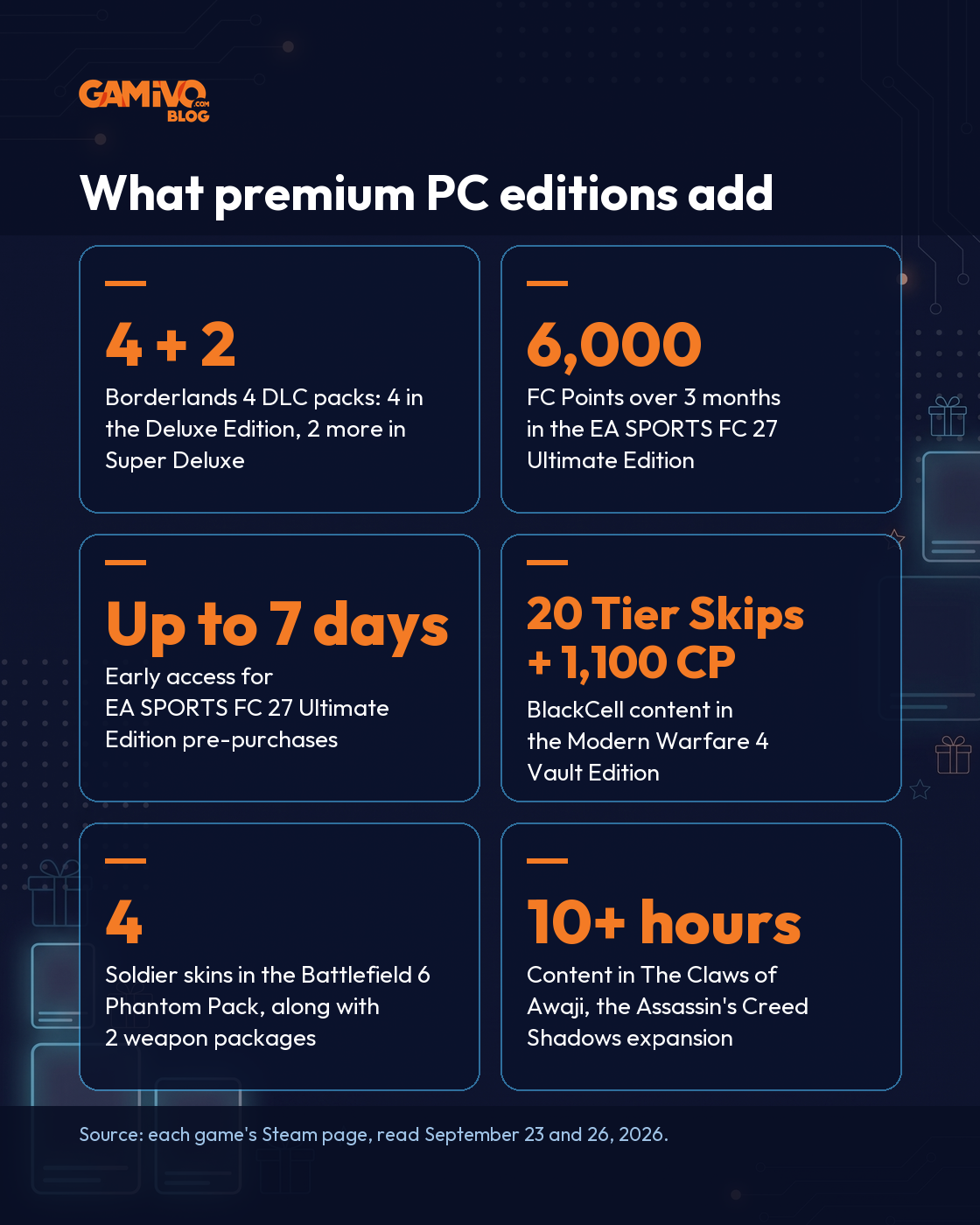
Borderlands 4 shows how a season-style bundle maps onto editions. Its Steam page says the “Bounty Pack Bundle consists of 4 separate post-launch DLC packs.” That bundle comes with the Deluxe and Super Deluxe Editions. The “Vault Hunter Pack consists of 2 separate post-launch DLC packs,” and only the Super Deluxe Edition includes it. Both packs “will also be available for separate purchase at launch (base game required).”
Is early access in a premium edition worth paying for?
Early access in a premium edition means playing the same game a few days before launch day. The game itself does not change. EA SPORTS FC 27 listed “Up to 7 days Early Access” as a pre-purchase bonus of its Ultimate Edition on Steam. We read that page on September 23, 2026, one day before the game’s release.
Early access does not always come with the most expensive edition. Call of Duty: Modern Warfare 4 has a release date of October 22, 2026. Its Steam page offers “Campaign Early Access, starting October 16th” to players who pre-purchase “any digital edition.” In that case, the base edition gets the same head start as the premium one.
Valve’s own advice to developers is skeptical about pre-purchase offers. Its documentation says pre-purchases “tend to be ineffective unless it’s a heavily anticipated, heavily marketed title.” Valve suggests that developers “wait until release and run with a discount off your product during the first week of sales.” Waiting for launch day can therefore bring a launch discount, while paying for early access only buys a few extra days with the same game.
When does a premium edition pay for itself?
A premium edition pays for itself only when you would buy most of its extras separately. The test takes three steps. List the extras and check which ones the publisher also sells on their own. Then count only the ones you would really buy. If those extras match what the higher edition adds, the upgrade is worth it.
A premium edition usually pays off in these cases:
- You plan to play the expansion. The Assassin’s Creed Shadows Premium Edition includes “The Claws of Awaji Expansion, which features a new region, a new weapon, new skills, and 10+ hours of content.”
- You play the online mode that uses currency and passes. The EA SPORTS FC 27 Ultimate Edition lists “6,000 FC Points over 3 months” and a “Season 1 Premium Pass.” The Modern Warfare 4 Vault Edition lists “BlackCell (1 Season).” BlackCell “Includes: Battle Pass, 20 Tier Skips, 1,100 CP and more.”
- You would buy every DLC pack anyway. In Borderlands 4, the Deluxe and Super Deluxe Editions group post-launch DLC packs that the publisher also sells one by one.
A premium edition does not pay off when the extras are mainly cosmetic or built for online modes you skip. It is also a poor bet if you are not sure you will finish the base game. Currency bonuses can also come with deadlines. EA notes that “You must complete the steps to obtain the initial FC Points distribution by August 1, 2027 to receive all 6,000 FC Points.”
Can you upgrade from Standard to Deluxe later?
Often, yes, because many publishers sell premium content as a separate upgrade or DLC. Valve’s documentation describes a DLC package used “if your customers buy your base game first and then later wish to purchase the deluxe content.” Starting with the standard edition lets you pay for extras only after you know you enjoy the game.
Battlefield 6 is a clear example. The Phantom Edition adds a “Battlefield Pro Token,” “The Phantom Pack” and a “Phantom XP Boost Set.” The separate Battlefield 6 Phantom Upgrade on Steam lists the same three items.
Bundles can make a later upgrade cheaper. That is the idea behind Complete the Set bundles, which let players “buy just the content that they don’t already own.” Our guide to the best deals on Steam games explains how “Complete The Set” bundles and their discounts work.
How to save money on PC games: five Steam titles compared
Each of these five PC games builds its premium edition differently, with later DLC, in-game currency for online modes or early access. The table below lists what each higher edition adds, as described on each game’s Steam page on September 26, 2026.
| Game | Editions on Steam | What the higher edition adds | Sold separately? |
|---|---|---|---|
| Borderlands 4 | Base game, Deluxe, Super Deluxe | Deluxe: Bounty Pack Bundle (4 post-launch DLC packs); Super Deluxe: also the Vault Hunter Pack (2 DLC packs) | Yes, both packs, base game required |
| Assassin’s Creed Shadows | Base game, Digital Deluxe, Premium | Deluxe: Sekiryu Dual Pack, Sekiryu Hideout Pack, five mastery points; Premium: Sekiryu gear set, two katanas, a mount, a trinket and the Claws of Awaji expansion | Claws of Awaji is a separate Steam product |
| Battlefield 6 | Base game, Phantom Edition | Battlefield Pro Token, Phantom Pack (4 soldier skins, 2 weapon packages and more), Phantom XP Boost Set | Yes, as the Phantom Upgrade |
| EA SPORTS FC 27 | Base game, Ultimate | Season 1 Premium Pass, 6,000 FC Points over 3 months; before release, up to 7 days of early access for pre-purchases | Not stated in the edition description |
| Call of Duty: Modern Warfare 4 | Base game, Vault Edition | Two operator packs, Signature Weapon Collection (5 weapons), BlackCell for 1 season, DMZ Deployment Bonus | Yes, as the Vault Edition Upgrade; campaign early access comes with a pre-purchase of any digital edition |
Where do game keys fit?
A game key is a code that activates a game or an edition on a platform account such as Steam. The edition you activate decides which extras you get. Before you buy a key on another site, check that the product name matches the edition you want, whether Standard, Deluxe or Ultimate.
On GAMIVO, customers can buy game keys from suppliers. Each product page describes the platform and any limits of the key. GAMIVO’s FAQ asks buyers to “use the code on the correct platform or software: Steam, Blizzard, EA App, Ubisoft Connect, or any other, specified in the description.” It also says: “Please, make sure to check the region, language, platform, or any other restrictions on the product page.” Our guide on how game key sites work explains the whole process. The guide on where to buy digital game codes covers other platforms.
Frequently asked questions
To save money on PC games, buy the edition whose extras you will use. Skip premium editions built around cosmetics or early access you do not need. When unsure, start with the standard edition, since many publishers also sell premium content later as an upgrade. Wishlist games on Steam to get a notice about discounts of 20% or more.
A Deluxe edition is worth it when you would buy most of its extras separately. Good examples are a season pass or an expansion you plan to play. It is usually not worth it when the extras are mainly cosmetic items or a few days of early access. Compare the list of extras on the game’s Steam page before you choose.
Often, yes. Many publishers sell premium content as a separate upgrade or DLC. Valve’s documentation describes a package for customers who “buy your base game first and then later wish to purchase the deluxe content.” Battlefield 6, for example, offers a Phantom Upgrade with the same extras as its Phantom Edition.
No. A season pass includes only the DLC listed in it. On Steam, a season pass must show “A complete list of all DLC included in the Pass.” Each item also needs an expected release date, at least as a quarter or a season and year. DLC that is not on that list is not part of the pass.

GTA 6. Everything we know so far [Release, editions, and pre-orders]
To say that people were excited about the GTA 6 news would be an understatement. One of the most popular RPG games ever made has finally received its first trailer.

GTA Games in Order: The Complete History of Grand Theft Auto
Find out how Grand Theft Auto grew from a 1997 top-down crime game into one of the best-selling franchises ever made. This guide lists all GTA games in order of release and recaps each one: the story, the gameplay, and its impact on the industry.