Rencontrez-vous un problème ?

search

Nous sommes à votre disposition, 24 hueres sur 24, 7 jours sur 7 !

Bienvenue au centre d'information ! Notre équipe d'assistance est là pour s'assurer que vous ayez la meilleure expérience possoble, n'hésitez donc pas à nous solliciter si vous avez des questions ou des doutes. Nous sommes là pour vous aider !
  • Orders
    Orders
  • Account
    Account
  • Payments
    Payments
  • Other
    Other
Bloqué
When will I receive the key? thumb_up 5891 keyboard_arrow_down

The key will be delivered as soon as your payment is registered. The time frame may differ depending on the payment method and your payment provider. It usually does not take more than a few minutes. However, in case of some payment methods (e.g. zondacrypto pay) it may take even up to a few hours.

In case you do not receive the order, please check its status in the Orders tab in your Purchase history. If the status shows “hold,” please check your Support Tickets and if your inbox is empty, please contact us by submitting a Ticket.

If you are not sure about your order status please, hover the mouse over the "i" icon in the Orders tab of the Purchases section.

Cela vous-a-t-il été utile ?
Avez-vous toujours un problème ?
My SMART prices disappeared after activating SMART. Why? thumb_up 888 keyboard_arrow_down

Most likely, you have already had a Smart subscription in the past or did not use the promotion correctly.

Please check our other article LINK.

We also recommend contacting our Support Team either via chat or ticket, they will help you as quickly as possible.

Cela vous-a-t-il été utile ?
Avez-vous toujours un problème ?
When will the product be available again? thumb_up 551 keyboard_arrow_down

Unfortunately, it is not possible to check the expected availability for us but be assured that our merchants tend to restock their keys often, especially when there is a high demand for them.

Cela vous-a-t-il été utile ?
Avez-vous toujours un problème ?
Why can I still see the offer if the key was out of stock? thumb_up 6600 keyboard_arrow_down

Our merchants’ stock fluctuates all the time. That means, the product could have been out of stock a minute ago but now the keys are available again because the merchant restocked them in the meantime. It is also possible that another user resigned from their order and the key was added to the stock again.

Cela vous-a-t-il été utile ?
Avez-vous toujours un problème ?
When will I receive my preorder? thumb_up 2250 keyboard_arrow_down

Rest assured that your key will be delivered no later than the release day. Be informed that release dates tend to differ depending on the region of purchase meaning that for example, keys for ARG region might be released and delivered later than keys for Europe. We as Gamivo, follow the Europe release dates for all products.

Cela vous-a-t-il été utile ?
Avez-vous toujours un problème ?
Populaire
How can I contact you? thumb_up 4086 keyboard_arrow_down

You can contact us regarding any inquiries at supportcenter@gamivo.com


Alternatively, please go to: https://www.gamivo.com/account/support and click "Create New Ticket". If you already have a pending ticket, please go to the "Waiting" section and check if we've responded to you yet.

Cela vous-a-t-il été utile ?
Avez-vous toujours un problème ?
Why did I pay more than it was shown on the site? thumb_up 378 keyboard_arrow_down

The final price of the order always includes the mandatory service fee and taxes. You can check the entire cost before checkout in your shopping cart once prompted to choose the payment method.

Cela vous-a-t-il été utile ?
Avez-vous toujours un problème ?
I didn't get my key but I was charged thumb_up 755 keyboard_arrow_down

Please double-check the status of your order. If it says canceled or pending, then most likely we have not received any funds for it and the deducted amount will be returned to you by the payment provider chosen for the transaction within a few business days. For more information, you can always contact our Support Team.

Cela vous-a-t-il été utile ?
Avez-vous toujours un problème ?
Smart Free Game thumb_up 6535 keyboard_arrow_down

The free game offer is available after the third month of subscription, only for members whose Smart subscription was renewed for the first time on and after June 8th, 2022. 

The prize expires after a week if it will not be redeemed earlier.

Note that the code is always meant for Steam.

Cela vous-a-t-il été utile ?
Avez-vous toujours un problème ?
Will the key work on Mac? thumb_up 576 keyboard_arrow_down

Mac offers are always specified on the product page and in the product name. If you do not see that information on the page, you should assume it is only meant for Windows.

Cela vous-a-t-il été utile ?
Avez-vous toujours un problème ?
How can I cancel my SMART subscription? thumb_up 1146 keyboard_arrow_down

You can cancel the renewal of your SMART subscription at any point in the Gamivo SMART Pass section of your GAMIVO.

Simply scroll down and click on "Deactivate Gamivo SMART Pass." 

In case you decide to cancel the subscription on the same day you activated it, please make sure you confirm it in the email that comes within 24 hours from the cancellation request.

Cela vous-a-t-il été utile ?
Avez-vous toujours un problème ?
When can I expect my preorder to be delivered? thumb_up 474 keyboard_arrow_down

The pre-ordered key will be delivered no later than the release day.

Certain suppliers may have the keys available at an earlier time. Therefore some sellers may be able to deliver keys earlier than others.

Please, keep in mind that there may be embargos or other rules in place preventing the distribution of the products before the release date. Release dates tend to differ based on the region. GAMIVO follows the EU release dates for all products.

Additionally, as stated in our Terms and Conditions: 7.7. Pre-orders can be canceled at any time up to 3 days before the release date as long as the product, or any bonuses associated with it, have not been delivered. Refunds for pre-orders requested after that time may be denied.

For the upcoming releases, please check our Pre-orders calendar.

If you are still waiting for the pre-order, please be patient as some merchants are still uploading the keys and you should receive yours soon. In case of any problems, feel free to contact us via the Ticket System.

Cela vous-a-t-il été utile ?
Avez-vous toujours un problème ?
What does my order status mean? thumb_up 457 keyboard_arrow_down

Here you can find all statuses explained:

  • Pending - we did not receive the funds for the order. It will not be completed and you will not be further charged. If you were charged for a pending order, please contact our Support Team.
  • Hold - your order was most likely held due to security reasons. Please check your Support Tickets and email inbox. If we did not send you one already, please contact us via Ticket.
  • Processing - your order is being processed and should be completed soon. 
  • Accepted - the order was accepted to be delivered to you. It may take a bit longer for the order to be completed. In case of longer delays, feel free to contact our Support Team.
  • Completed - your order was completed and the product was delivered. You can find your keys in the Games tab in the Purchases section of your account.
  • Refunded - your purchase was refunded. Please check your balance or your original payment account.
  • Canceled - your order was canceled. If you are not aware why, please contact the Support Team to learn more.
  • Blacklisted - your account was suspended. Please contact the Support Team to get more information about the reason.
Cela vous-a-t-il été utile ?
Avez-vous toujours un problème ?
Do I need an account to buy keys? thumb_up 465 keyboard_arrow_down

We've recently implemented guest purchases on Gamivo, so it's no longer necessary to have an account. 

If you wish to place an order as a guest, simply enter the email address you want us to send your key to (make sure there are no typos!). If you already own a Gamivo account and place a guest order, the order will be bound to your existing Gamivo account.

Cela vous-a-t-il été utile ?
Avez-vous toujours un problème ?
Can I have a discount code? thumb_up 399 keyboard_arrow_down

We highly encourage you to check our social media (Facebook, Twitter, Instagram,) and our main page as we have many promotions planned.

Additionally, if you join our SMART subscription, you will have access to our exclusive deals every month. For more check SMART.

Cela vous-a-t-il été utile ?
Avez-vous toujours un problème ?
Why does the product page show different regions? thumb_up 366 keyboard_arrow_down

Our product pages are still being developed and updated. Please make sure to carefully check the product page and base your purchasing decisions on the ⚠️ notice on the top of the page and not the "Region" section on the right. 

Cela vous-a-t-il été utile ?
Avez-vous toujours un problème ?
Will the preorder bonus be included? thumb_up 333 keyboard_arrow_down

Please always refer to the product page. In case the bonus is included, it will be mentioned in the product’s description.

Having that in mind, pre-order bonuses might not be included but some merchants can still deliver them along with the game. 

Cela vous-a-t-il été utile ?
Avez-vous toujours un problème ?
Can I return unused keys and receive a refund? thumb_up 589 keyboard_arrow_down

You can request a return as long as the key has not been displayed.

Please keep in mind that you usually have 1 day to request a refund for an unused product. This depends on the merchant's individual ToS available on their profile. Requests placed after this time may be rejected. Also, if the product you purchased has an expiry date, in some cases, we may not be able to accept it for return.


In case you bought a Steam Gift, the return process will be handled a bit differently. Please, contact our Support Team.


Cela vous-a-t-il été utile ?
Avez-vous toujours un problème ?
I used a coupon in my order but it was not processed and now I cannot use the discount again thumb_up 308 keyboard_arrow_down

In case you used a discount code in an unsuccessful order, please feel free to contact our Support Team. We will cancel the order and enable the coupon again.

Cela vous-a-t-il été utile ?
Avez-vous toujours un problème ?
What does once per account mean? thumb_up 273 keyboard_arrow_down

Be informed that some types of products can only be applied once to your account. That means that even if you used a similar code in the past, you still won't be able to activate the new key.

Cela vous-a-t-il été utile ?
Avez-vous toujours un problème ?
Where can I find the key I bought? thumb_up 206 keyboard_arrow_down

You can find all your keys in the Purchases section of your GAMIVO account. Simply click on the product you purchased and then on "DISPLAY THE KEY". Before you do so, please make sure to check the PLATFORM and REGION boxes.

The Games tab allows you to see the keys for all products you purchased, along with the ability to rate them.

In the Orders tab, you can find additional information regarding your orders such as the status of your order, the seller you purchased from, the payment method used, and the ability to download an invoice (as long as you requested it during the purchase).

If your order is displayed as "Completed", and you do not see the key, please open a Support Ticket.

Cela vous-a-t-il été utile ?
Avez-vous toujours un problème ?
How do I delete my GAMIVO account? thumb_up 468 keyboard_arrow_down

If you would like to delete your GAMIVO account please submit a request to our Support Team from the account you wish to delete.

Cela vous-a-t-il été utile ?
Avez-vous toujours un problème ?
Can I choose my GAMIVO SMART free game? thumb_up 152 keyboard_arrow_down

Unfortunately, you cannot.

The free game that comes with SMART subscription is completely random.

Cela vous-a-t-il été utile ?
Avez-vous toujours un problème ?
How can I delete my payment details from SMART? thumb_up 295 keyboard_arrow_down

Rest assured that we do not store nor have access to your payment details - all payments are handled by the payment method provider. The censored and incomplete information you see in the subscription details is there to let you know which payment method is being used to pay for the subscription and serves as evidence of payment. Once your subscription expires, that information will no longer be visible on your GAMIVO account.

Cela vous-a-t-il été utile ?
Avez-vous toujours un problème ?
I do not like the game anymore. Can I return it? thumb_up 117 keyboard_arrow_down

Unfortunately, once you redeem the key it is not possible to return the product and receive a refund for the purchase. We cannot make the key valid again and sell it to another customer.

Cela vous-a-t-il été utile ?
Avez-vous toujours un problème ?
Will I get a physical product? I did not insert my delivery address. thumb_up 90 keyboard_arrow_down

GAMIVO Marketplace does not deliver physical products i.e. boxes or DVDs. All products sold through GAMIVO are digital. They are provided in text or a picture and the delivery only takes a few minutes.

After a successful purchase, you will find your key in the Purchases section of your GAMIVO account. All you need to do now is to follow the product Activation Details and use the code on the correct platform or software: Steam, Blizzard, EA App, Ubisoft Connect, or any other, specified in the description.

Please, make sure to check the region, language, platform, or any other restrictions on the product page.

Cela vous-a-t-il été utile ?
Avez-vous toujours un problème ?
How long can a case be handled by the merchant or GAMIVO Customer Service? What if the merchant does not respond? How long do I have to wait? thumb_up 102 keyboard_arrow_down

Although there is no particular time frame, we make sure that each case is resolved as soon as possible. If we do not hear from the merchant within a reasonable time, we will take over resolving this matter for you.


Due to the nature of the issues reported to suppliers, some cases may take longer than others. Depending on the additional information required to resolve the issue it may take up to a few messages exchanged with the supplier or Customer Service to conclude.


GAMIVO Customer Service is available 24/7, so you can rest assured that we attend to all questions and issues as quickly as possible.


If your issue is handled personally by the Supplier and you cannot reach an agreement, you will have the option to engage us in the dispute. This option is available after 72 hours since opening a complaint.

Cela vous-a-t-il été utile ?
Avez-vous toujours un problème ?
What does the “pending” status of my order mean? thumb_up 98 keyboard_arrow_down

Most of the time, the “pending” status of your order means that the transaction was not processed correctly and we did not receive the payment for the order; it will not be further completed and you will not be charged for the transaction. In case, however, you were charged, the payment provider should return the funds within a few business days. Should any problems arise, please contact our Support Team.


Should you encounter issues with the payment, please make sure you entered your data correctly, try again at a later time or with a different payment method, and make sure that the payment method of your choice has 3D-Secure enabled.

If you used a discount code on a pending order, please let us know and we will cancel it for you.

Cela vous-a-t-il été utile ?
Avez-vous toujours un problème ?
What is SMART? thumb_up 81 keyboard_arrow_down

SMART is our premium subscription service that guarantees you the lowest prices and additional exclusive features.

These include:

  • Customer Protection Program for the whole SMART subscription period (no need to buy it for each order/product),
  • Customer Service Live Chat Access,
  • Pre-order Delivery Priority,
  • Exclusive Discounts,
  • Best deals Alerts,
  • Outstanding Giveaways.

For more information visit our dedicated page.

Cela vous-a-t-il été utile ?
Avez-vous toujours un problème ?
What is Customer Protection Program and do I need to buy it? thumb_up 64 keyboard_arrow_down

The Customer Protection Program is not mandatory but we highly recommend it! You can opt-in to participate in the Program by ticking the box visible in your Cart. It is a guarantee of swift assistance in case of any issues you might encounter.

You do not need to purchase the Customer Protection Program for every product if you are a SMART subscriber. Click here to find out more about our subscription.

For detailed information, please refer to our Terms and Conditions.

Cela vous-a-t-il été utile ?
Avez-vous toujours un problème ?
The prices are very low compared to other sites. Are those offers and products legitimate? thumb_up 58 keyboard_arrow_down

The worldwide availability of the products sold ensures constant competition for the best quality and the lowest prices among the sellers. Our sellers go through a verification process to ensure they are trusted and their offers are legitimate.

We constantly monitor the products and sales on our website to guarantee the best quality of services provided.

Cela vous-a-t-il été utile ?
Avez-vous toujours un problème ?
I did not receive the email confirmation for my order. What happened? thumb_up 129 keyboard_arrow_down

Please make sure that you used the correct email address for your purchase and check your spam folder as well.

You may verify whether the order was properly placed by viewing the Purchases section of your GAMIVO account and checking the Orders tab.

Cela vous-a-t-il été utile ?
Avez-vous toujours un problème ?
How can I change my email address? thumb_up 82 keyboard_arrow_down

If you wish to change your email address, please contact our Support Team. We will explain the procedure to you.

Cela vous-a-t-il été utile ?
Avez-vous toujours un problème ?
How can I change the payment method for SMART? thumb_up 54 keyboard_arrow_down

To change the payment account for your subscription, please go to the Gamivo SMART Pass section of your account. In the Payments and transactions tab, click the Change button.

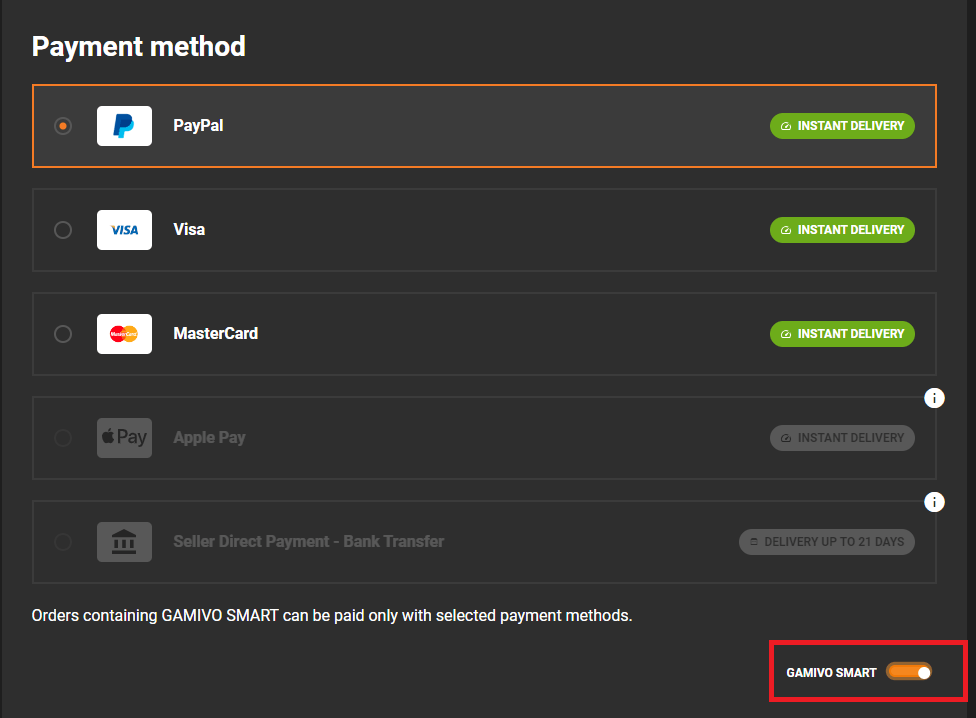
The supported payment methods for SMART are currently PayPal and card payments.

Cela vous-a-t-il été utile ?
Avez-vous toujours un problème ?
Where can I see my Tickets? thumb_up 35 keyboard_arrow_down

You can find your Tickets in the Support section of your GAMIVO account. There, you will find additional tabs for any open, waiting, and closed cases.

The Open tab shows the Tickets you submitted, the Waiting tab shows Tickets waiting for your reply, and the Closed tab stores all resolved past cases.

Cela vous-a-t-il été utile ?
Avez-vous toujours un problème ?
What does Customer Protection Program do when resolving an issue with the supplier? thumb_up 29 keyboard_arrow_down

The Customer Protection Program guarantees a higher priority to your case. We will take all measures necessary to resolve the issue as fast as possible. Please, keep in mind that we may still request some more details from you to help us find an appropriate solution.

Cela vous-a-t-il été utile ?
Avez-vous toujours un problème ?
Will I be charged for SMART if my order is canceled? thumb_up 59 keyboard_arrow_down

SMART is activated the moment your order is completed so you can rest assured that you will not be charged for it. Moreover, you will receive an additional confirmation email to let you know about the details of the subscription.

In case of any questions or issues with your payment, please contact our Support Team.

Cela vous-a-t-il été utile ?
Avez-vous toujours un problème ?
How does SMART work? How do I subscribe? thumb_up 32 keyboard_arrow_down

You can activate SMART in three ways:


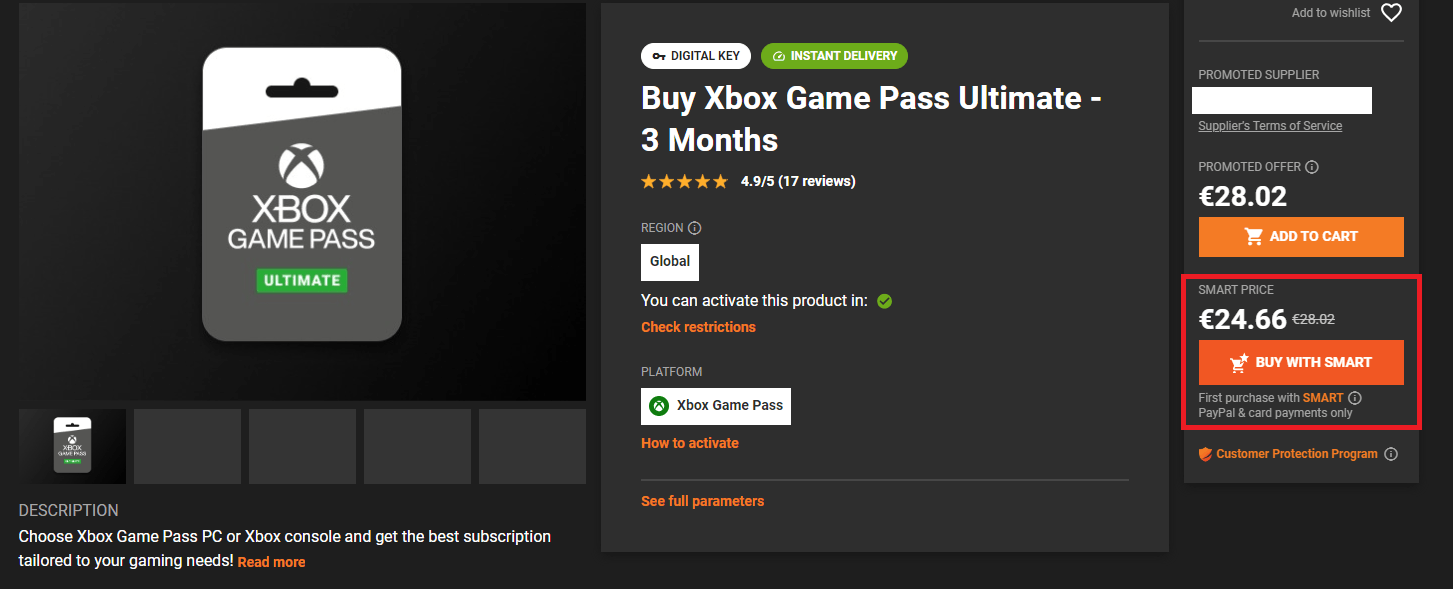
  1. As a part of our special offer by choosing to buy a product you are interested in with the Smart Price,
  2. As a part of your order by choosing the supported payment method,
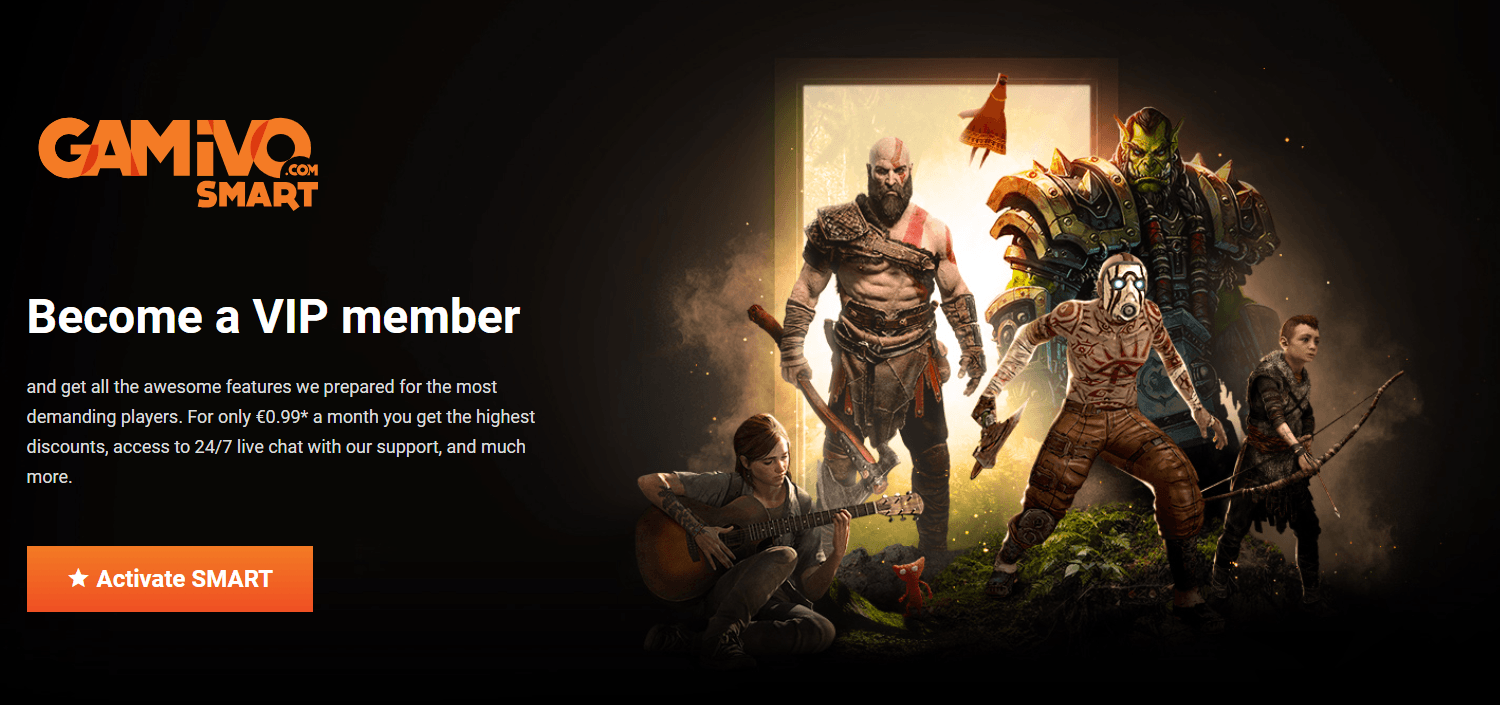
  3. Separately, from our SMART page.

Currently, the supported payment methods for SMART include PayPal and credit/debit card payments.

Cela vous-a-t-il été utile ?
Avez-vous toujours un problème ?
BASKET-SMART Price thumb_up 5 keyboard_arrow_down

Smart Price offer (BASKET-SMART coupon) is available only to new subscribers. To take advantage of this promotion correctly, please make sure that you are choosing the SMART Price on the product page. Note that, the subscription must be purchased simultaneously with the product, otherwise, the promotion will not appear.


Bear in mind that the coupon can be used on orders with a value of up to €250.


Cela vous-a-t-il été utile ?
Avez-vous toujours un problème ?
What is GAMIVO Marketplace? thumb_up 860 keyboard_arrow_down

GAMIVO is a gaming marketplace, created by gamers for gamers. Years of experience in the field allow our Team to provide the best quality of services available in the market. Our priority is to deliver digital goods to our customers quickly and easily, so you can enjoy your games without worrying about the difficulties connected with the delivery of physical products.

Our merchants offer an incredible variety of digital products. You will find games, DLCs, in-game currency, and many others, available for several platforms. These include, but are not limited to Steam, Origin, Blizzard, Ubisoft Connect, GOG, or console platforms. This variety allows us to offer a staggering range of products at competitive prices.

GAMIVO operates using the latest and best security measures to protect the business and the information of our customers and merchants. With those in place, you can focus on getting the best deals for your gaming needs. In addition, our Customer Service is available 24/7 to ensure the best customer experience.

Cela vous-a-t-il été utile ?
Avez-vous toujours un problème ?
I would like to get a refund for my order, what can be done? thumb_up 889 keyboard_arrow_down

Please bear in mind that a digital product cannot be accepted for return once used. There is no possibility to make it valid again or resell it to another customer. If the key was already used by you, there is nothing we can do.

If the key remains unused, we can accept a return. Our Support Team will explain the procedure to you.

In case of any issues with the key activation, do not hesitate to contact us.

Cela vous-a-t-il été utile ?
Avez-vous toujours un problème ?
When I try to activate the code I receive a message that the code is invalid. thumb_up 618 keyboard_arrow_down

This usually means that code could not be recognized by the platform. Please, double-check if you are activating it correctly. You can use the Activation Details section in the product description for reference.

Also, try to re-type the code and look for any possible typos.

If the problem persists, please make sure to contact our Support Team.

Cela vous-a-t-il été utile ?
Avez-vous toujours un problème ?
I cannot log in to my account thumb_up 189 keyboard_arrow_down

Make sure that you are entering the correct information and that there’s no typo in your email address or password. 

If there’s not, please use the “forgot my password” option and proceed accordingly. The email should be sent to your inbox within a few minutes (please also check your Spam folder.)

While setting a new password, please make sure that it meets all the requirements shown on the page.

Cela vous-a-t-il été utile ?
Avez-vous toujours un problème ?
How do I activate Office? thumb_up 448 keyboard_arrow_down

In case of Microsoft Office 2021, please proceed the following way:


  1. Go to www.office.com/setup,
  2. Sign in with your Microsoft account, or create one if you don't have one yet,
  3. Enter your product key and follow the instructions shown to finish the redemption process.


You can also try redeeming the code here: https://redeem.microsoft.com/


If the above methods don’t work, please:


  1. Start an Office app, (like Word, Project, or Visio, depending on your purchase),
  2. In the ‘Sign in to set up Office window, select ‘I don't want to sign in or create an account (the small link at the bottom of the window)’,
  3. Enter your Office product key, without hyphens and confirm.


In case of Office 2013, 2016 or 2019, please proceed the following way:


  1. Start an Office app, (like Word, Project, or Visio, depending on your purchase),
  2. In the ‘Sign in to set up Office window, select "I don't want to sign in or create an account (the small link at the bottom of the window)",
  3. Enter your Office product key, without hyphens and confirm.


If your error shows as 0xC004C008, please also try the following method:

  1. In the Activation Wizard, select I want to activate the software by telephone, and then select Next. If nothing happens when you select Next, use the Enter key on your keyboard.

  2. Under Step 1 in the Activation Wizard, select your country/region, and then call the Product Activation Center phone number that’s listed under the country/region you selected.

  3. When prompted by the Product Activation Center, provide the Installation ID that's shown in the Activation Wizard under Step 2.

  4. The Product Activation Center will provide a Confirmation ID that you enter in the Activation Wizard under Step 3.

  5. Select Next and follow the prompts to complete the activation process. If nothing happens when you select Next, use the Enter key on your keyboard.

Cela vous-a-t-il été utile ?
Avez-vous toujours un problème ?
I lost my 2FA device. What can I do? thumb_up 37 keyboard_arrow_down

If you have lost the device used for two-factor authentication, it may be necessary to verify your identity before we can allow you to access your account due to security reasons. Please contact our Support Team and they will explain the procedure.

Cela vous-a-t-il été utile ?
Avez-vous toujours un problème ?
How do I activate Windows 10? thumb_up 382 keyboard_arrow_down


  1. Select the Start button, and then select Settings > Update & Security > Activation.
  2. Select ‘Change product key’.
  3. Type in the product key and follow the instructions.


For other activation methods, open this link - https://support.microsoft.com/en-us/windows/activate-windows-10-c39005d4-95ee-b91e-b399-2820fda32227


If your error shows as 0xC004C008, please also try the following method:


  1. Click on Start and select Settings > Update & Security > Activation.
  2. Select Activate Windows Now section, and then Activate by Phone.
  3. Select your location (or the location nearest to you) from the drop-down list, and then click Next.
  4. Call one of the available phone numbers listed. An automated system will guide you through the activation process.
  5. If you're not able to complete activation successfully, you will be connected to Microsoft support for your region and country.


If you are having any issues with the first two steps, you can also try the following to start the phone activation by a system command:


  1. Open Run window (also can be found under "Start").
  2. Type in SLUI 04 and follow with Enter.
  3. The rest of the steps should be the same as above.


Make sure that you are trying to redeem the code on the same version of the OS, mismatch between Home/Professional/etc. versions may cause additional issues.

Cela vous-a-t-il été utile ?
Avez-vous toujours un problème ?
I encountered a ‘key already used’ error message, what should I do? thumb_up 408 keyboard_arrow_down

Some platforms may keep showing this error message even though the game is already on your account. Please, check your games library to verify this.

If you purchased a DLC, and you don’t own the base game, some platforms may still allow you to activate the product. It won’t be visible in your library.

Feel free to contact our Support Team if these cases don’t apply to you. We’ll do our best to assist you!

Cela vous-a-t-il été utile ?
Avez-vous toujours un problème ?
How do I activate Windows Server? thumb_up 324 keyboard_arrow_down

If your version of Windows Server shows as Evaluation, you will have to convert it to the Standard edition first. All Microsoft product keys must be activated on the matching software version.


For Windows Server Datacenter, please use the following command:


DISM /Online /Set-Edition:ServerDatacenter /ProductKey:XXXX-XXXX-XXXXX-XXXXX-XXXXX /AcceptEULA 


If you are using Windows Server Standard, use this command:


DISM /Online /Set-Edition:ServerStandard /ProductKey:XXXX-XXXX-XXXXX-XXXXX-XXXXX /AcceptEULA 


Once your Windows Server is converted, please follow the installation wizard and in case of any further issues do not hesitate to contact our Support Team.


Cela vous-a-t-il été utile ?
Avez-vous toujours un problème ?
How do I activate Windows 11? thumb_up 239 keyboard_arrow_down
  1. Go to Settings > System > Activation > Update product key > Change product key.
  2. Enter the 25-character code in the pop-up window. Alternatively, enter the key during the installation process.
  3. Now click on 'Next' to redeem it.


Your new operating system is now activated!


For other activation methods check here: https://support.microsoft.com/en-us/windows/activate-windows-c39005d4-95ee-b91e-b399-2820fda32227#WindowsVersion=Windows_11


If your error shows as 0xC004C008, please also try the following method:


  1. Select Start > Settings > System > Activation.
  2. Under Activate Windows Now section, select Activate by Phone.
  3. Select your country in the drop-down menu and follow the on-screen instructions
  4. Call the toll-free number and follow the instructions to activate your Windows


If you are having any issues with the first two steps, you could also try the following:


  1. Open "Run" window (can also be found under "Start")
  2. Type in "SLUI 04" and follow with Enter.


The rest of the steps should be the same as above.


Make sure that you are trying to redeem the code on the same version of the OS, mismatch between Home/Professional/etc. versions may cause additional issues.

Cela vous-a-t-il été utile ?
Avez-vous toujours un problème ?
I cannot find the answer to my query. Can you help me? thumb_up 84 keyboard_arrow_down

Certainly! If you cannot find the answer to your question in our FAQ, please contact our Support Team. We will be happy to assist you!

Cela vous-a-t-il été utile ?
Avez-vous toujours un problème ?
What does it mean that the game is EU, US, CA, EMEA, LATAM, etc.? thumb_up 55 keyboard_arrow_down

These abbreviations indicate regional restrictions for the offer. EU stands for European Union; US for the United States; CA for Canada; EMEA for Europe, Middle East, and Africa; LATAM for Latin America. Products labeled with those can only be activated in the specified regions. ‘Global’ products can be activated anywhere in the world.

In addition, you will find the details regarding any restrictions in the description of the product. Please, remember to check if there is a Notice on the top of the page with additional restrictions provided and that you can also filter your search by region.


  • Global - can be activated anywhere in the world (check the product page to make sure there are not any exceptions)
  • EMEA - Europe, Middle East, and Africa
  • CIS - The Commonwealth of Independent States (Armenia, Azerbaijan, Belarus, Kazakhstan, Kirghizstan, Moldavia, Uzbekistan, Russia, Tajikistan, Turkmenistan, Ukraine)
  • LATAM - Latin America
Cela vous-a-t-il été utile ?
Avez-vous toujours un problème ?
I found a mistake on your website. Can I report it? thumb_up 55 keyboard_arrow_down

Yes, and we will be very thankful. Any feedback is greatly appreciated. Other than questions, if you have any suggestions or ideas that you would like to pitch to the GAMIVO staff, feel free to send those in a support ticket. Thank you!

Cela vous-a-t-il été utile ?
Avez-vous toujours un problème ?
I received a different game, what should I do? thumb_up 46 keyboard_arrow_down

You should contact our Support Team. Most likely the seller made a mistake. We will do our best to clarify the situation as soon as possible!

Cela vous-a-t-il été utile ?
Avez-vous toujours un problème ?
Where do I activate my key? thumb_up 46 keyboard_arrow_down

The Activation Details are available on each product page either by clicking on the Activation Details button or in the description of the product. You may also find the information under the Games tab of the Purchases section of your GAMIVO account. Simply click the button “How to Activate” for detailed instructions.

Below you can find articles explaining where to activate keys for the following platforms:

Cela vous-a-t-il été utile ?
Avez-vous toujours un problème ?
I am interested in establishing a business partnership with your company. How can I contact you? thumb_up 36 keyboard_arrow_down

Please contact us through our Support Center, we will forward your case to the corresponding department after basic verification.

Cela vous-a-t-il été utile ?
Avez-vous toujours un problème ?
Can I use my native language to communicate with Customer Service? thumb_up 44 keyboard_arrow_down

If it is more convenient for you, you can use your native language while reporting an issue to our Customer Support Team.

GAMIVO Customer Service is currently available in English and Polish only.

Cela vous-a-t-il été utile ?
Avez-vous toujours un problème ?
Is there any way to receive updates on the special offers and news from GAMIVO? thumb_up 28 keyboard_arrow_down

Most certainly! You can follow us on Facebook, Twitter, Instagram, and Reddit. In addition, feel free to sign up for the newsletter.

To do that, please, go to your Account Settings and check the Newsletter box.

Cela vous-a-t-il été utile ?
Avez-vous toujours un problème ?
I encountered some technical issues. Can I be refunded for the key? thumb_up 40 keyboard_arrow_down

If you redeemed the key and it activated the product matching its description on our website, we will not be able to provide you with any form of reimbursement if you are experiencing technical issues (such as. game crashing, not launching, etc.)

The customer must make sure that the technical specifications of their hardware meet the game's requirements for which they purchase a key.

A digital product cannot be accepted for return once used. It is not possible to make it valid again or resell it to another customer. We can only advise you to contact the game’s developer or the publisher to check if there is any fix or patch that may help you.

Cela vous-a-t-il été utile ?
Avez-vous toujours un problème ?
I can't use my discount coupon thumb_up 3380 keyboard_arrow_down

Please ensure that the product you wish to purchase meets the requirements for the discount coupon. Usually, such information is displayed on our promotional banner on the main page, or - if you have received the coupon via email - in the email message.

In case your payment failed and now the coupon cannot be used, please contact our Support Team as soon as possible so that they cancel the order and reactivate the coupon.

Cela vous-a-t-il été utile ?
Avez-vous toujours un problème ?
Why does my verification code not come? thumb_up 25 keyboard_arrow_down

First, please make sure that your phone number prefix matches the country you are trying to verify in. If it does, then make sure to turn off any VPN software you might be using. Next, try relogging into your account.
If the above-mentioned steps do not work, please contact our Support Team.

Cela vous-a-t-il été utile ?
Avez-vous toujours un problème ?
I have some questions about your Affiliate program. Can you help me? thumb_up 2 keyboard_arrow_down

If you would like to be a partner, please message us at partnership@gamivo.com

Most information can be found under this link: https://www.gamivo.com/affiliate 


We’ve gathered the most useful information for you here:

  1. When will the balance be available?

Payment for the sale of a product will be approved to your balance after 7 days from the date of the transaction provided you’ve met all requirements.


  1. When can I withdraw my funds?

The minimal amount you can withdraw is €50 and the maximum is €1000.

All payments will be transferred via PayPal. Any fees that will occur will be covered by the affiliate.


  1. How much time is there to purchase via the link?

After clicking the link, you have 24h to complete the transaction. After that period, you should renew the process by clicking the link again.


  1. My balance was not added, why?

If you believe your affiliate balance was not granted correctly, first of all, please check if it has been 7 days since the purchase. If so, please contact our Support Team and they will forward your case to the corresponding department.


Cela vous-a-t-il été utile ?
Avez-vous toujours un problème ?
How can I change my currency? thumb_up 1 keyboard_arrow_down

You can change your currency in the upper right corner of our website.


For mobile version, please scroll down to the end of the page.

Cela vous-a-t-il été utile ?
Avez-vous toujours un problème ?
How can I change the language on site? thumb_up 1 keyboard_arrow_down

You can change your language in the upper right corner of our website.


For mobile version, please scroll down to the end of the page.

Cela vous-a-t-il été utile ?
Avez-vous toujours un problème ?
When will I receive the refund? thumb_up 405 keyboard_arrow_down

There are two refund options we offer:

  • GAMIVO balance refund - it appears on your account instantly in the Balance section and you can use it to purchase any products on our site.
  • Regular refund with the same payment method used in the order - since the refunds are being taken care of chronologically, it usually takes a couple of days before it's processed.


In case of some payment methods such as for example zondacrypto pay and RazerGold, it is not possible to issue a refund back to the original payment account due to the payment providers' restrictions.

Cela vous-a-t-il été utile ?
Avez-vous toujours un problème ?
What payment methods are available? thumb_up 278 keyboard_arrow_down

You can pay for your purchases with one of the numerous payment methods depending on your region and the chosen currency. All the available methods will be visible at the payment step of your purchase.

Some of the most popular payment methods are also visible at the very bottom of the page.

Cela vous-a-t-il été utile ?
Avez-vous toujours un problème ?
How fast will I get a confirmation that the payment was approved? thumb_up 158 keyboard_arrow_down

You will receive a notification as soon as the payment is registered. It should not take more than a few minutes.

Cela vous-a-t-il été utile ?
Avez-vous toujours un problème ?
I am reluctant to provide you my payment details. Is it safe? thumb_up 95 keyboard_arrow_down

Please do not worry, we do not store your payment information. We have several systems in place to prevent any fraudulent activity so you can safely place your order.

Cela vous-a-t-il été utile ?
Avez-vous toujours un problème ?
Where can I find an invoice? How can I check if the merchant issues them? thumb_up 79 keyboard_arrow_down

All invoices can be found in the Purchases section of your GAMIVO account in the Orders tab.

If you wish to receive the invoice, make sure to request it during the placement of your order! 

You can request it in the Summary of the checkout process. Simply tick the Invoice details box and provide all the necessary information. 

Please remember that not all merchants will be able to issue an invoice for the product. It is indicated by an orange document icon next to their name on the product page.


Cela vous-a-t-il été utile ?
Avez-vous toujours un problème ?
Is VAT included in the price? How is it handled? thumb_up 73 keyboard_arrow_down

Every GAMIVO customer is charged the correct VAT value based on their country of residence within the EU. When placing an order, you are required to choose the correct location from the drop-down menu in the bottom right corner of the Purchase Summary view.

Please note that the price of the SMART subscription is also affected by the tax value.

Cela vous-a-t-il été utile ?
Avez-vous toujours un problème ?
Can I withdraw Balance from my GAMIVO account? thumb_up 65 keyboard_arrow_down

There are two types of balance available on our platform: solvent, and insolvent.

The first can be earned through the affiliate system and can later be withdrawn to your chosen payment account.

The latter comes from balance refunds and cashback offers and can only be used on GAMIVO for any purchases as a full or partial payment method.

Cela vous-a-t-il été utile ?
Avez-vous toujours un problème ?
Where can I find the confirmation of my purchase? thumb_up 77 keyboard_arrow_down

All the necessary information is sent to you in the confirmation email once you place the order. Additionally, you can find the details of your order in the Purchases section of your GAMIVO account in the Orders tab.

Cela vous-a-t-il été utile ?
Avez-vous toujours un problème ?
How can I use my GAMIVO balance? thumb_up 61 keyboard_arrow_down

You can use GAMIVO balance to lower the price of the product or to pay for the whole order.


  1. Go to your Cart.
  2. Adjust the slider above the total price of your order to the amount you wish to spend.
  3. Click “Go to checkout.”
  4. Choose a second payment method to pay the rest of the price.


In case the chosen balance amount covers the whole price of the order, you will be notified and the regular payment methods will become unavailable.

Cela vous-a-t-il été utile ?
Avez-vous toujours un problème ?
Which payment method is the fastest? thumb_up 62 keyboard_arrow_down

Most of the payments are registered on our account within a few minutes. For the ones that take longer, should that happen, we encourage you to check the payment status with your payment provider. Please note that payments processed by zondacrypto pay may take up to 24 hours to be completed.

In case of any issues with the payment process, please contact our Support Team.

Cela vous-a-t-il été utile ?
Avez-vous toujours un problème ?
Can I combine GAMIVO balance with another payment method? thumb_up 33 keyboard_arrow_down

Yes, you can pay a part of the price with your balance and the rest with a second payment method of your choice.

  1. Go to your Cart.
  2. Adjust the slider above the total price of your order to the amount you wish to spend.
  3. Click “Go to checkout.”
  4. Choose a second payment method to pay the rest of the price.
Cela vous-a-t-il été utile ?
Avez-vous toujours un problème ?
I have not received my top-up order thumb_up 4348 keyboard_arrow_down

Our sellers aim to deliver the top-ups within 30 minutes. If this time has already passed, please verify if you provided the correct credentials (server region, UID, etc.). If you notice any typo or another error, please create a support ticket; in most cases, we can pass this information on to the seller and quickly fix the issue.

If you are sure that there was no error on your side, contact us via our ticket system too, and we will help as soon as possible.


Please keep in mind that some of the direct top-up offers are restricted in several regions. Before you place an order, make sure the server you play on is on the list of available ones.

Cela vous-a-t-il été utile ?
Avez-vous toujours un problème ?
Can I top-up my GAMIVO balance? thumb_up 26 keyboard_arrow_down

For retail customers, topping up GAMIVO balance is available only through GAMIVO Gift Cards. You can also earn GAMIVO balance through our affiliate system or our cashback offers.

Cela vous-a-t-il été utile ?
Avez-vous toujours un problème ?
Does my balance have an expiry date? thumb_up 4 keyboard_arrow_down

Unless the balance was granted through a cashback coupon which usually has an expiry date, then no - you can use your balance anytime you wish.

Balance earned through gift cards has an expiry date of 365 days.

Cela vous-a-t-il été utile ?
Avez-vous toujours un problème ?

Encore besoin d'aide ? Nous sommes à vos côtés !

Créez un ticket et décrivez votre problème, nous ferons de notre mieux pour vous aider.